
The Media Uploader Template is the OTV Sweepstakes Template with the addition of the Media Uploader Component and an automatically given text area element. The Media Uploader Template is meant for sweepstakes that you want users to submit media for review as part of the sweepstakes submission. Photos and videos uploaded into the Media Uploader can be viewed in a Report pulled in the Analytics section of Campaign Manager.
The Media Uploader Component can be used to accept photos, videos, or both.
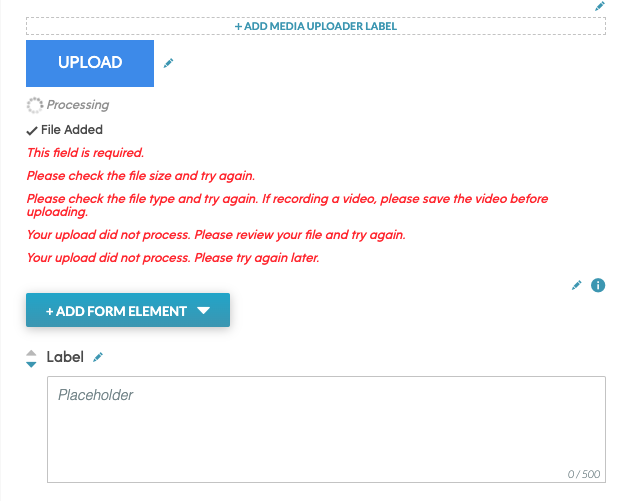
In the Media Uploader Component, you can:
- Add a Title or Label
- Edit text in the submission button (i.e. Upload Photo, Upload Video, Upload Media)
- View/Edit all upload states and errors
To configure your Uploader component, click on the pencil icon in the upper right hand corner.
NOTE: All Upload states and errors are listed below the Upload Button.
Once you click the pencil icon, the following modal will pop up.
In this modal you can:
- Choose what type of media is accepted
- Determine if an upload is required
- Update Confirmation, Processing, and Error Texts
- Update fonts, text colors, and size
