
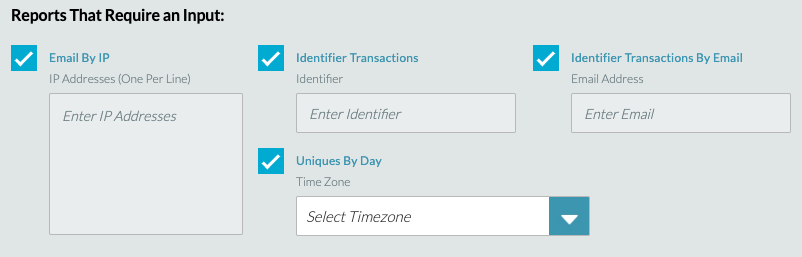
Reports which require manual input of additional data field info.
Email By IP
An IP address needs to be inputted into the box provided. Displays a list of email addresses associated with votes from the specific IP, broken down by contestant. This is a key report for campaigns where you may see system abuse from an IP and then you want to drill down and see the actual email addresses. This helps you to see if there are any patterns associated with the email addresses. This only works for campaigns where email is the identifier.
Identifier Transactions
The Identifier must be inputted into the box provided (e.g. phone number, Facebook ID, email address, single sign on ID,Twitter ID etc). Displays the complete list of transactions, with date and time stamp, for a specific identifier across the specified report time period. For SMS and toll-free, input 001 before the phone number (no spaces) E.g. 0014242702904 for the US
Uniques By Day
This report requires you to input the time zone you want from a drop down menu. Type the city or country (e.g. Los Angele swill then display America: Los Angeles to get the Pacific Time Zone). Provides unique voter summary across all media types, broken down by day based on specified time zone.
Identifier Transaction By Email
The email associated with an Identifier must be inputted into the box provided. If email is collected but not the identifier (in the case of Facebook the Facebook ID is usually the Identifier but we often gather and store email, if available), it can be more useful to use this instead of the Identifier Transactions report as it shows Identifier and email so is more useful for accuracy testing/auditing/customer care. Like Identifier Transactions, it will display all the transactions for an email address across the specified time period.