
The publishing information can be found under the Publishing Info tab within a campaign.
The Publishing Info Page has two parts:
- Campaign ID and URL info
- Broadcaster API info
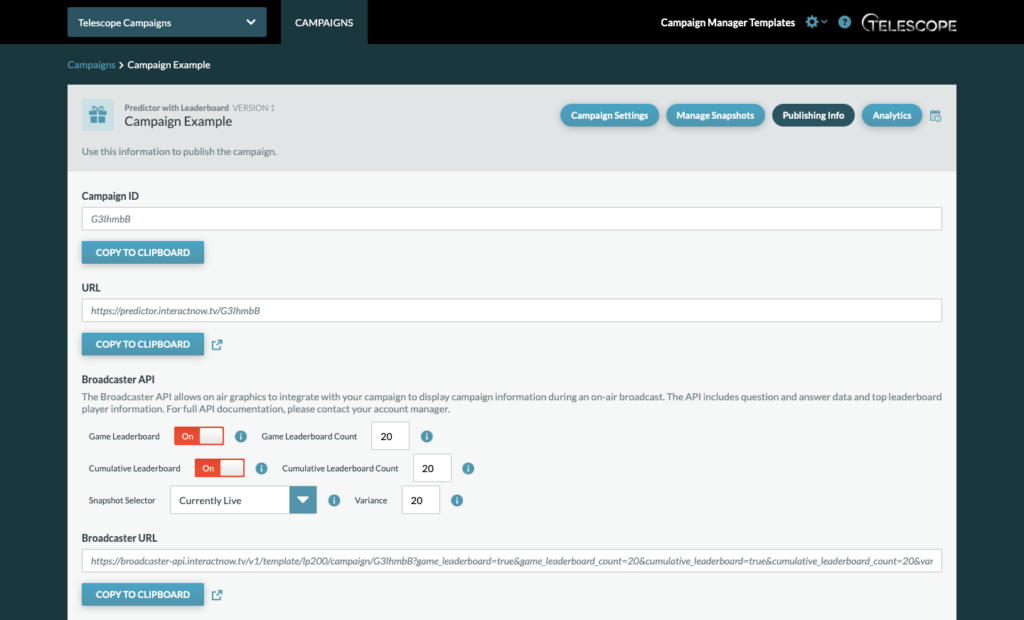
Campaign ID and URL info
Campaign ID: The Campaign ID is unique to every campaign and is auto generated from the platform. Campaigns can be located by searching with this ID on the Campaigns Dashboard.
URL: The URL is the live URL for the campaign.
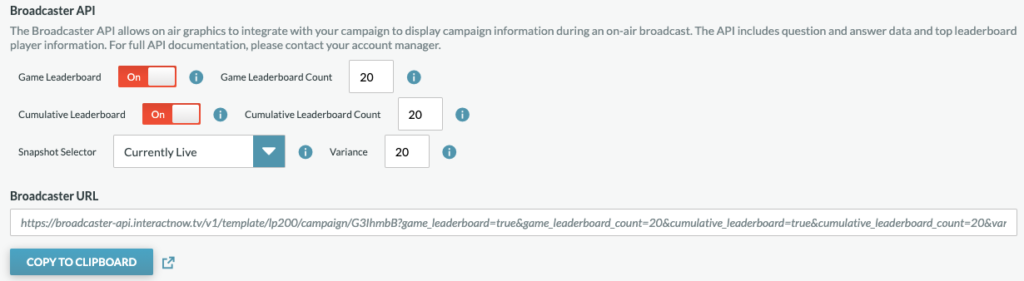
Broadcaster API
Broadcaster API: This API allows on air graphics to integrate with your campaign to display campaign information during an on-air broadcast. This info is custom to each campaign.
The API includes question and answer data, and top leaderboard player information for both the Game and Cumulative Leaderboards.
Game Leaderboard & Cumulative Leaderboard: Toggle the Leaderboards on and off from the Broadcaster API to determine whether or not the leaderboards will be displayed on-air. You can choose to display the top 1-100 Leaderboard entries on-air.
Snapshot Selector: Select the Snapshot you wish to have live on air with the dropdown button. Add a variance of 1-100 to determine the animation range of the vote option percentages.
Broadcaster URL: The Broadcaster URL is the API link for the on-air integration.
For full API documentation, please contact your account manager.