
All question types, including Prediction (default), Trivia, Poll, and Write-In, can have default settings for scoring.
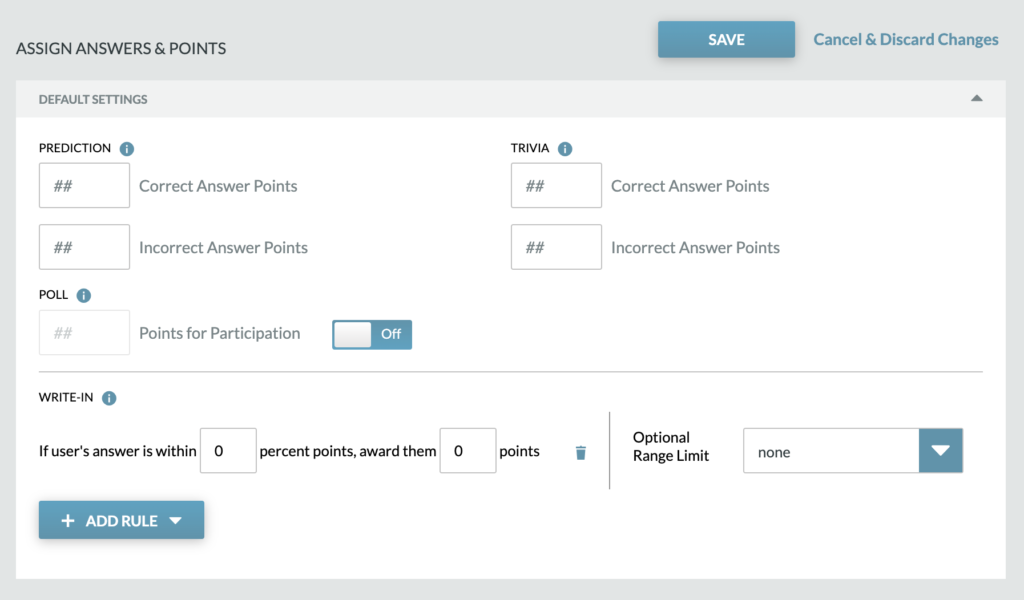
The Default Settings section is expanded by default and all default scoring will be set here. If there unique scoring needed for a specific question (any type) you can chose to check “Override Defaults” on the Question Card and add the specific scoring.

For Trivia and Poll scoring information, visit the Trivia & Poll Questions section.
For Write-In scoring information, visit the Write-In Scoring section.
For Timed Trivia scoring information, visit the Timed Trivia scoring information.
Information on assigning correct answers to Prediction questions can be found on the Assigning Answers and Points section. This page also includes the color key for each stage of the answer cards.